Convierte tu libro en PDF sin salir de Hilo
Terminaste tus capítulos y quieres un archivo que puedas leer, compartir o imprimir. Esto es lo que entrega el exportador de Hilo, cómo se usa y lo que no promete.
Turn your book into a PDF without leaving Hilo
You finished your chapters and you want a file you can read, share or print. Here's what Hilo's exporter delivers, how to use it, and what it doesn't promise.
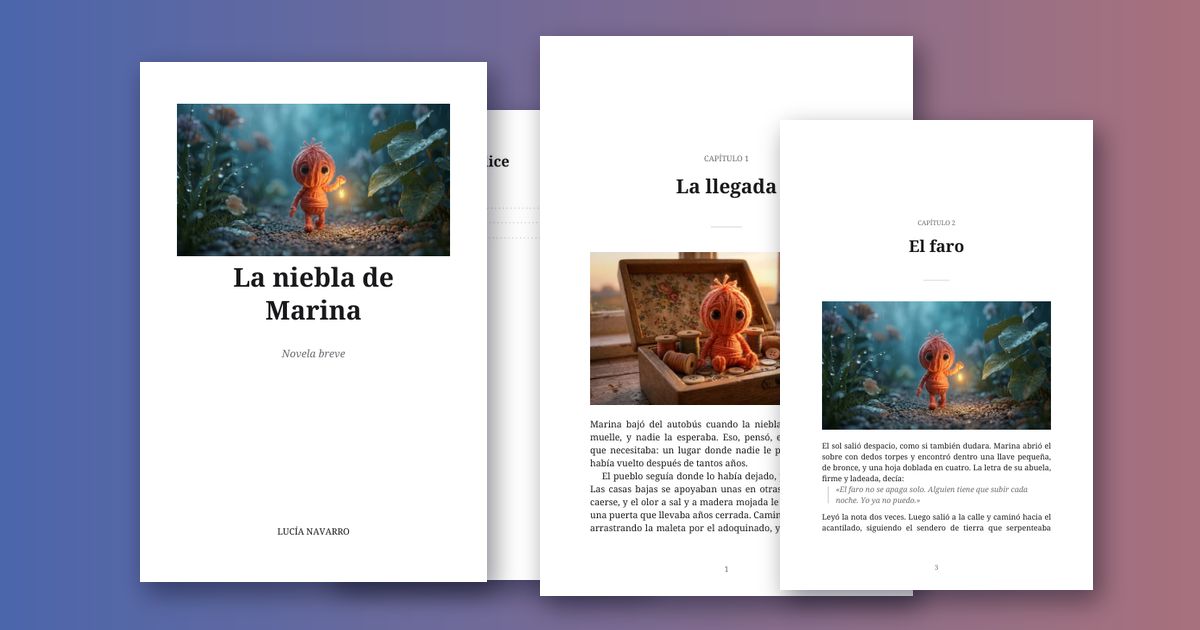
Escribiste tus capítulos con Hilo, los ilustraste y los fuiste afinando en el chat. Cuando el libro está listo, lo que sigue es tenerlo en un solo archivo. Desde un Proyecto Narrativo, el botón "Exportar libro a PDF" lo arma por ti, sin salir de Hilo.
Qué trae el PDF
- Portada con el título, un subtítulo y el autor si quieres, y la imagen que elijas (si no eliges ninguna, la primera ilustración de tu libro).
- Página de título y un índice con el número real de página de cada capítulo.
- Capítulos que abren con su título, con su ilustración (o solo la portada, si lo prefieres), texto justificado y páginas numeradas.
- Tipografía con serifa incrustada, pensada para leer: nombres con letras como ḥ, ā, ī, ñ o signos como « » y — salen bien.
Cómo se hace
Toca "Exportar libro a PDF" (en el teléfono está en el menú ⋯). Se abre un cuadro con todo ya marcado: el tamaño, si quieres una ilustración por capítulo o solo la portada, y dos campos opcionales, autor y subtítulo. Tocas "Exportar PDF" y se descarga.
Los tamaños son A5 (cuaderno), 6 × 9 pulgadas (el tamaño habitual de un libro impreso), A4 y Carta. En un Cuento Ilustrado el PDF lleva una imagen y su texto por página, en formato cuadrado, A5 o Carta.
La portada, a tu manera
En los Ajustes del Proyecto (en el teléfono, en el menú ⋯) y dentro del propio cuadro de exportar encuentras "Portada del libro". Puedes crearla con Hilo en formato vertical (te propone ideas a partir de tu título y tu historia, y ves el costo antes de crearla), elegirla de tu Galería o subirla desde tu dispositivo. Si tu imagen ya trae el título y el autor, elige "Mi imagen ya es la portada" y el PDF la pone a página completa, sin escribirle nada encima. Elegir o subir una imagen no cuesta nada; solo crearla con Hilo usa créditos, como cualquier imagen.
Qué se deja fuera, y qué te avisa antes
El chat a veces agrega, al final de una respuesta, notas de producción, tablas o prompts para otra herramienta. Eso no es parte del libro, así que el exportador no lo incluye, y te dice cuánto dejó fuera. Si tu texto tiene caracteres que el PDF no puede poner (por ejemplo, letras hebreas o árabes, emojis o flechas), te avisa antes de exportar cuáles son y salen como un signo de interrogación; puedes corregirlos o exportar así.
Cuánto cuesta y dónde se arma
Nada: exportar no gasta créditos. El PDF se arma en tu propio navegador, así que tu libro no sale de Hilo para hacerlo, y no lleva ninguna marca nuestra. Es tuyo.
Lo que no es
Es un PDF cuidado para leer, compartir o imprimir en casa. No es la maquetación de una editorial, y no prometemos que esté listo para subirlo tal cual a una plataforma de publicación: eso depende de los requisitos de cada una. Tampoco compone escrituras que se leen de derecha a izquierda. Y recuerda que el contenido generado por IA sin edición humana probablemente no está protegido por derechos de autor: revisa y edita lo que vayas a publicar.
You wrote your chapters with Hilo, illustrated them, and refined them in the chat. When the book is ready, the next step is having it in a single file. From a Narrative Project, the "Export book to PDF" button builds it for you, without leaving Hilo.
What the PDF includes
- A cover with the title, a subtitle and the author if you want, and the image you choose (if you don't choose one, the first illustration of your book).
- A title page and contents with the real page number of each chapter.
- Chapters that open with their title, with their illustration (or just the cover, if you prefer), justified text and numbered pages.
- An embedded serif typeface, made for reading: names with letters like ḥ, ā, ī or ñ and marks like « » and — come out right.
How it works
Tap "Export book to PDF" (on a phone it's in the ⋯ menu). A box opens with everything already set: the size, whether you want one illustration per chapter or just the cover, and two optional fields, author and subtitle. Tap "Export PDF" and it downloads.
The sizes are A5 (notebook), 6 × 9 inches (the usual size of a printed book), A4 and Letter. For an Illustrated Story the PDF carries one image and its text per page, in square, A5 or Letter.
Your cover, your way
In the Project settings (on a phone, in the ⋯ menu) and inside the export box itself you'll find "Book cover". You can create it with Hilo in a vertical format (it suggests ideas from your title and your story, and you see the cost before creating it), pick it from your Gallery or upload it from your device. If your image already has the title and the author, pick "My image is the whole cover" and the PDF puts it on a full page, writing nothing over it. Choosing or uploading an image costs nothing; only creating one with Hilo uses credits, like any image.
What's left out, and what it warns you about first
The chat sometimes adds production notes, tables or prompts for another tool at the end of a reply. That isn't part of the book, so the exporter leaves it out, and tells you how much it left out. If your text has characters the PDF can't hold (for example Hebrew or Arabic letters, emoji or arrows), it warns you before exporting which ones they are, and they come out as a question mark; you can fix them or export as is.
What it costs and where it's built
Nothing: exporting doesn't use credits. The PDF is built in your own browser, so your book doesn't leave Hilo to make it, and it carries no mark of ours. It's yours.
What it isn't
It's a carefully made PDF to read, share or print at home. It isn't a publisher's typesetting, and we don't promise it's ready to upload as-is to a publishing platform: that depends on each one's requirements. It also doesn't set right-to-left scripts. And remember that AI-generated content without human editing probably isn't copyright-protected: review and edit what you plan to publish.
Exporta tu primer libro
Los Proyectos y la exportación a PDF están en los planes de pago, desde $4.99/mes.
Export your first book
Projects and PDF export are on the paid plans, from $4.99/month.